PCB design review
Design review that reads your datasheets, not just your netlist
A netlist check only confirms the board matches the schematic you drew — not that it does what you intended. Probe reads each part’s datasheet against the netlist and BOM, and catches the functional errors that pass ERC and DRC. Every finding cited to the data.
Free to view — no CAD licence • Self-hosted • Any ECAD, built on ODB++
Why teams ship faster
Catch the error before the prototype
An intent error that slips through review shows up at bring-up — where the fix is a respin and weeks of schedule. Probe puts those errors on screen during review, pre-layout if you want, so they’re caught while a fix is still an edit, not a spin.
Earlier
Review from schematic and BOM, before any layout exists.
Fewer spins
A functional error caught in review is one you don’t find at bring-up.
Shorter schedule
Fewer iterations between a design and hardware that works.
Ask the board
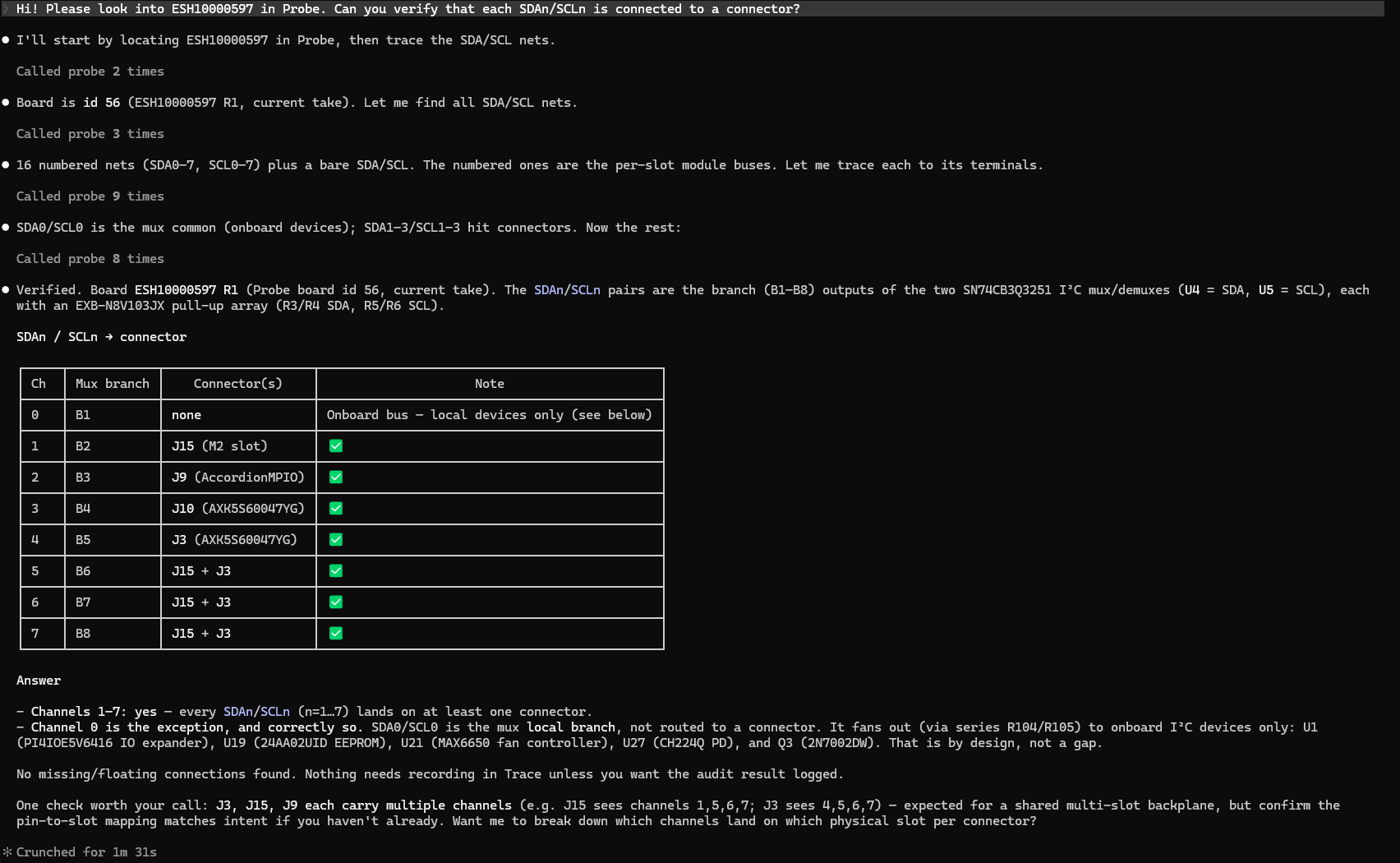
Ask your board — get cited answers
The review runs through an AI assistant over MCP: you ask in plain language, Probe answers from the real board data, and shows the net or finding behind the answer as proof. You’re not clicking through a viewer — you’re querying the design.
Answers are traced, not guessed. Probe cites the netlist line, layout location or datasheet value it drew from, and where it can’t back a claim it says so. Citations are checked verbatim, and a claim the data can’t support is refused at the write boundary — not dressed up as a guess.
What Probe catches
The mistakes a clean DRC waves through
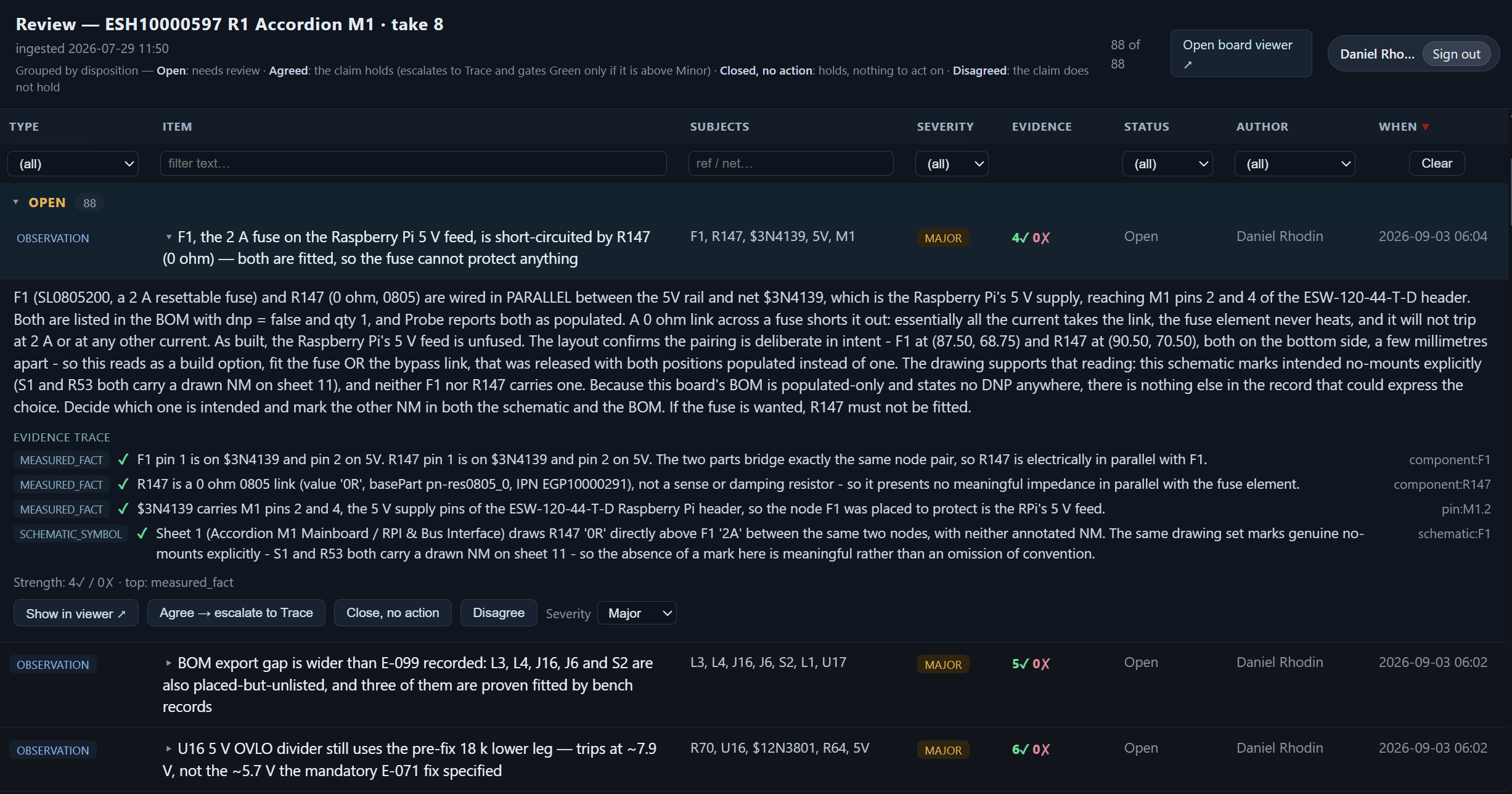
Ten findings from our own boards. Every one passes DRC, ERC and a netlist check against the schematic — each looks locally correct. The error only shows when two facts from different places are put side by side.
- A current source whose own readback can’t see its shunt — a wrong shunt still reads perfect.
- Twenty-eight unspecified BOM positions, each one bypassing an eFuse’s protection.
- A resettable fuse shorted by a fitted 0 Ω link — the rail ships unfused.
- A rail believed to be switched that still feeds the DUT when its converter is disabled.
- One letter in a part number that inverts the fail-safe and pulls an I²C bus low.
- A fix that re-referenced a supply and pushed two pins past absolute maximum.
- A “1.8 V” rail that really lands between 1.72 V and 2.11 V once the regulator’s own bias is counted.
- A 12 V rail whose worst case trips its own supervisor — because the BOM sets no resistor tolerance.
- A net named
…_OUTthat is really the switch node, carrying the full switching waveform. - Two connectors on one adaptor, one pin apart — odd and even swapped throughout.
A rule checker knows the rules of the board. Probe reads the parts.
What teams gain
Every finding comes with its proof
Faster reviews
Cross-checking pins against datasheets becomes lookups, not an evening’s work — and the answer carries its citation.
More eyes on the board
Viewing is free — anyone can open the design without a CAD seat or a stack of screenshots. You license only the review seats that author findings.
Mistakes caught earlier
Functional errors a clean DRC waves through get found on screen, where they’re cheap.
Knowledge retained
Findings stay linked to the design data and searchable on the next design.
- Reviews without consuming CAD licences
- Findings retained when senior engineers leave
- One review process across multiple ECAD tools and sites
- A traceable record for quality and compliance
How Probe works
From the design you already have to a reviewed board
Bring the design data
Schematic + BOM to start, before layout exists. Add the ODB++ you already export once you have it.
Probe reads the parts
On your own server. It fetches (or you upload) each component’s datasheet and reads it — absolute-maximum tables, fail-safe defaults, pin functions — and structures the netlist, BOM and layout so the board can be queried. It never changes your design.
Review by asking
Ask the board over MCP; findings attach to the net or component they concern, each traced to the design data.
Answers you can trace
Every answer cites its source. Probe abstains rather than guesses.
Carried to future boards
A finding on a part is inherited by the next board that uses it — searchable, this board and the next.
Front of the project
Review before layout — schematic + BOM only
You don’t need a finished board to start. Probe runs a full review from the schematic and BOM alone, with no layout at all.
Run it as the design takes shape — re-check each schematic revision against the datasheets and BOM as you go, so a wrong part or a mis-referenced pin is caught when it’s introduced, not three weeks later at bring-up. The earlier a functional error surfaces, the cheaper it is to fix.
Evidence, not opinion
Every finding carries its proof
Review findings today are opinions that get lost in email — Probe makes them cited facts that stay. A finding carries its proof: the netlist line, the layout location, the datasheet value. The engineer who has to fix it verifies it in one click instead of re-deriving it.
And where Probe can’t ground a claim in the board’s data, it says so rather than guessing — an abstention you can act on beats a confident answer that’s wrong.
Across designs
Findings that carry forward
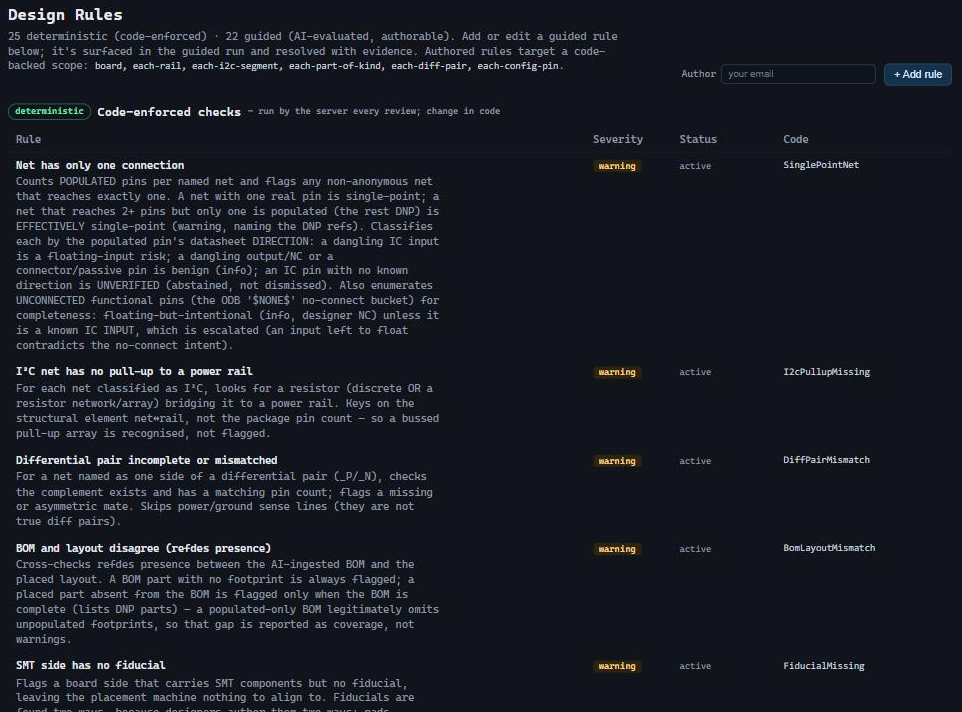
A finding is worth more than the meeting it was raised in — but that’s usually where it dies, in a thread or a PDF margin, gone by the next project. Probe keeps findings as cited facts attached to the net and the component they concern.
A note stored on a part is inherited by every future board that carries it — so the next review starts from what the last one already found, not from zero.
Open the design
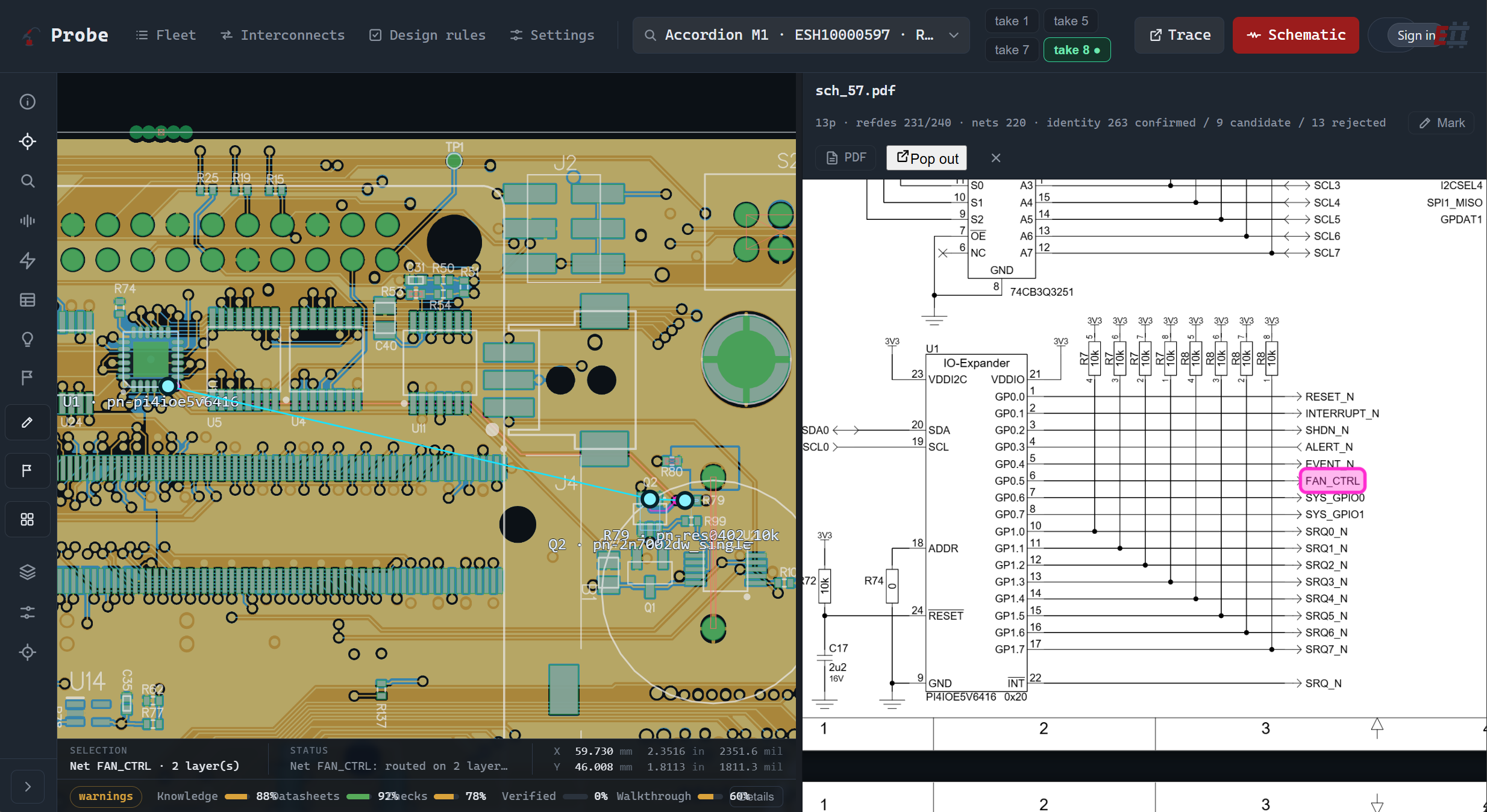
Cross-probe the board — everyone, any CAD
A viewer shows you shapes; Probe knows what they’re connected to. Cross-probe a net from the schematic to the layout and back, follow it through connectors and planes, and search the whole design. Viewing is free — no CAD seat to look.
Going deeper — add-on
Interconnect: the seams between boards
Probe reviews one board. Interconnect takes a whole system — many boards joined by connectors and cables — and makes its pinout traceable, queryable and checkable, instead of worked out by hand in a spreadsheet. The system is held as one product, with its own revision.
Trace a signal end to end
Follows a signal through every board and cable in the system, and tells you where and why it stopped.
Check the pin map against copper
Validates a claimed pin map against real copper on both sides — and flags the contacts the map claims but the copper doesn’t have.
Never guesses orientation
Shows the candidate orientations, rules out what the copper excludes, and asks for the drawing rather than guessing.
In practice
Real defects that pass every other check
We use Probe on our own designs, and across whole systems. Short write-ups of real findings — the defect, the question that surfaced it, and the citation behind it.
A CERN board, graded against CERN’s own tracker
We ran Probe on CERN’s open-hardware DI/OT board and checked it against their public issue tracker — 62 findings, most of what CERN caught in verification, some a revision early.
Read the case → Case study · InterconnectTwo boards, both correct, and 5 V on a Raspberry Pi
Two correct boards, sixty contacts, all passing. Seat them together and a 5 V rail lands on a Raspberry Pi’s 3.3 V header.
Read the case → Case studyTwelve volts exactly
A feedback divider that computes to 12.000 V — and a supervisor one resistor class clears by 60 mV and another misses by 776 mV. The BOM doesn’t say which.
Read the case → Case studyThe formula was right. The number wasn’t in the datasheet.
A 1.8 V rail with the arithmetic on the schematic: 1.799 V. The equation is the datasheet’s own — one coefficient in it is not.
Read the case → Case studyTwo ways to set an address, and both of them fitted
Two zero-ohm links to strap an address high or low. This board had both fitted — a dead short the supply-to-ground rule couldn’t see.
Read the case →Clear boundaries
What Probe is not
Not DFM
DFM asks “can it be manufactured?” Probe asks “does the design do what we intended?” Run both on the same ODB++.
Not a design tool
Probe never modifies the design. Fixes happen in your ECAD flow — finding them no longer requires it.
Not a generic AI copilot
No answers from general knowledge. If it isn’t in your board’s data, Probe says so.
Not a replacement for judgment
Probe doesn’t decide if the design is good. It gives the person who decides a finding they can verify — and keeps it.
Probe vs today’s review flow
What changes on review day
When Probe is a fit
Honest scoping
A good fit when you…
- Can’t open the design without borrowing a licence or reviewing screenshots.
- Need findings that are traceable, not taken on faith.
- Have one or two engineers as the review bottleneck — or design solo.
- Run more than one ECAD, or hand designs across sites and EMS partners.
- Are losing review knowledge as senior designers retire.
Not the tool when you…
- Need manufacturability / DFM checks — use a dedicated DFM tool.
- Need copper geometry and clearance rules — that’s ERC/DRC.
- Want the tool to change the design for you.
Pricing
Priced to put review in everyone’s hands
List prices — annual subscription, on-premises. You pay for the review seats that author and analyse; everyone else views for free.
Base — Probe Team Server
€5,995
per year
- On-premises installation
- 2 review seats included
- Unlimited view seats
- + Add Interconnect — €2,000/yr
Additional review seats
from €1,495
per year, per review seat
- Author findings + run analysis
- €1,995 · €1,695 from seat 10 · €1,495 from seat 25
- Priced on total review seats
Site licence
€79,995
per year
- Unlimited review seats
- One site
- Interconnect included
Annual subscription — updates, security patches and support included while active; no separate maintenance fee. View seats are always unlimited and free. Bring your own AI key — no AI usage fee.
Frequently asked
Questions engineers actually ask
Is Probe a review tool or a board viewer?
A review tool. Viewing the design is the entry point, but the work happens in findings: created on the net or component they concern, traced to the design data, kept searchable for the next design.
Do reviewers need a licence?
Viewing is free and unlimited. You license only the review seats that author findings and run analysis.
Do I need a finished layout to start?
No. Probe reviews pre-layout from a schematic and BOM alone. Once you have layout, add the ODB++ you already export for fabrication.
Which ECAD tools does it work with?
Any flow that exports ODB++. Verified on KiCad, Siemens Xpedition/PADS, Cadence Allegro, Cadence OrCAD and Altium Designer; other ODB++ exporters work too — tell us your tool and we’ll confirm it.
How is it different from DFM or ERC/DRC?
DFM asks “can it be manufactured?”. ERC/DRC tell you the design is legal. Probe helps a human verify it’s right — a clean DRC and a wrong pull-up can coexist.
Can I trust the AI answers?
Don’t trust — verify. Every answer traces to the exact netlist line, layout location or datasheet value, citations are checked verbatim, and a claim with nothing to trace to is refused rather than guessed.
What is the Interconnect add-on?
It takes a whole system — many boards joined by connectors and cables — and makes its pinout traceable, queryable and checkable. It validates the claimed pin map against real copper and never guesses a connector orientation. Licensed per server, €2,000/year.
Where does my data go?
Nowhere. Probe is self-hosted on your own network. Design data stays on your side, and you bring your own AI key.
How do I buy?
Request a quote with your seat count and term, and we’ll set you up — or ask for hosted eval access first: we give you time-boxed access to Probe on a server we host.
Get Probe
Turn review findings into verifiable facts
Buy Probe for your team, or see it find a real defect on a live board first.